
postguard
GitHub · Rust · Core library and services
WARNING
This implementation has not been audited. Use at your own risk.
The main PostGuard repository. It contains the core encryption library, the Private Key Generator (PKG) server, WebAssembly bindings for browsers, a command-line client, and FFI bindings for native language integration.
The repo also includes a Docusaurus documentation site in the website/ directory, covering architecture, API reference, and Yivi integration. That content has been consolidated into this centralized docs site.
Workspace Structure
The repository is a Rust workspace with five crates:
| Crate | Description |
|---|---|
pg-core | Core library: metadata management, binary serialization, streaming encryption. Supports a native Rust backend (rust feature) and a WebCrypto-backed WASM backend (web + stream features). |
pg-pkg | HTTP API server (Actix-web) that runs a Private Key Generator instance |
pg-wasm | WebAssembly bindings via wasm-pack, used by the JavaScript SDK |
pg-cli | Command-line tool for encrypting and decrypting files |
pg-ffi | FFI bindings for calling Rust code from other languages (used by postguard-dotnet) |
The website/ directory contains a Docusaurus site deployed to GitHub Pages via the docs.yml workflow.
How It Works
PostGuard uses Identity-Based Encryption (IBE). Instead of public keys, the sender only needs the master public key and the recipient's identity (e.g. email address). To decrypt, the recipient proves their identity to the PKG via Yivi and receives a decryption key.
A typical session works as outlined below. In the diagram, steps that require user interaction (Yivi authentication, QR scan) are highlighted in red; the numbered list after the figure is the authoritative description.
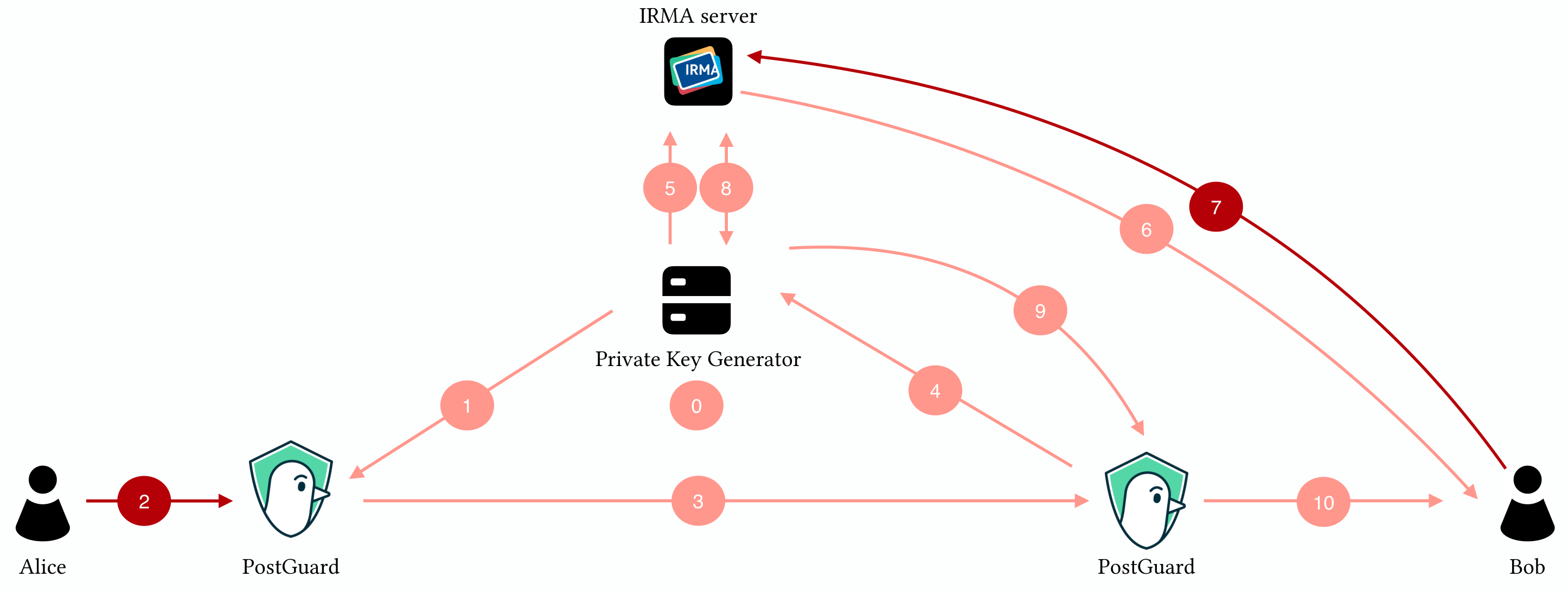
- The PKG generates a master key pair.
- The sender's client fetches the public master key from the PKG.
- The sender encrypts a message using the master public key and the recipient's identity.
- The ciphertext is sent to the recipient (through any channel).
- The recipient's client requests a decryption key from the PKG.
- The PKG starts a Yivi authentication session.
- The recipient proves their identity with the Yivi app.
- The PKG issues a decryption key for that identity.
- The recipient's client decrypts the message.
For the full protocol details, see the architecture overview and core concepts in the guide.
Cryptographic Primitives
| Primitive | Implementation |
|---|---|
| KEM | CGW-KV anonymous IBE on BLS12-381 (ibe crate) |
| IBS | GG identity-based signatures (ibs crate) |
| Symmetric | AES-128-GCM (128-bit security to match BLS12-381) |
| Hashing | SHA3-512 for identity derivation |
pg-core Feature Flags
pg-core supports two backends:
rust(default): uses RustCrypto crates for native Rust targetsweb: uses the Web Crypto API for WASM in browsers
Streaming mode is enabled with the stream feature flag. When active, encryption and decryption process data in 256 KiB chunks instead of loading everything into memory.
Development
Prerequisites
- Rust 1.90.0 or later
- Docker and Docker Compose (for the local development environment with PostgreSQL and Yivi server)
- wasm-pack (only for WASM development)
# Install Rust
curl https://sh.rustup.rs -sSf | sh

# Install wasm-pack (if working on pg-wasm)
cargo install --git https://github.com/rustwasm/wasm-pack.git
Building
# Build the full workspace
cargo build --release

# Build individual crates
cargo build --release -p pg-core
cargo build --release --bin pg-cli
cargo build --release --bin pg-pkg
Building WASM Bindings
cd pg-wasm
wasm-pack build --release -d pkg/ --out-name index --scope e4a --target bundler
For web target (without a bundler):
wasm-pack build --release -d pkg/ --out-name index --scope e4a --target webTesting
# Run all workspace tests
cargo test

# pg-core with all test features
cargo test -p pg-core --features test,rust,stream

# WASM tests (requires wasm-pack)
wasm-pack test --release --headless --chrome ./pg-wasm
wasm-pack test --release --headless --firefox ./pg-wasm
Development Environment
Docker Compose starts PostgreSQL and a Yivi (IRMA) server for local development:
docker-compose upThen run the PKG server against the local services:
cargo run --release --bin pg-pkg server \
  -d postgres://devuser:devpassword@localhost/devdb \
  -t <irma_token> \
  -i http://localhost:8088
Environment Variables
| Variable | Description | Default |
|---|---|---|
IRMA_SERVER | Yivi/IRMA server URL | https://is.yivi.app |
DATABASE_URL | PostgreSQL connection string | none |
PKG_ALLOWED_ORIGINS | Comma-separated CORS allowlist (e.g. https://postguard.eu,https://postguard.nl). Required: the server refuses to start without it. Pass * to deliberately allow any origin (this logs a warning at startup). Also available as --allowed-origins. | required |
PKG_RATELIMIT_PER_SECOND | Sustained request rate per client IP for the whole /v2 scope. Also available as --ratelimit-per-second. | 10 |
PKG_RATELIMIT_BURST | Burst allowance for the general /v2 limit. Also available as --ratelimit-burst. | 50 |
PKG_RATELIMIT_SENSITIVE_PER_SECOND | Sustained request rate per client IP for the key-issuing endpoints (POST /start, GET /key, GET /key/{timestamp}, POST /sign/key, GET /api-key/validate). Also available as --ratelimit-sensitive-per-second. | 2 |
PKG_RATELIMIT_SENSITIVE_BURST | Burst allowance for the sensitive-endpoint limit. Also available as --ratelimit-sensitive-burst. | 10 |
PKG_RATELIMIT_DISABLED | Set to true to build the limiter in permissive mode (every request passes). Use behind a trusted proxy that does its own rate limiting. Also available as --ratelimit-disabled. | false |
PKG_RATELIMIT_TRUST_FORWARDED_FOR | Set to true to key the limiter on the rightmost X-Forwarded-For entry instead of the TCP peer address, so per-client limiting works behind a trusted reverse proxy. Off by default so a directly exposed PKG never trusts client-supplied headers. Also available as --ratelimit-trust-forwarded-for. | false |
PKG_EMAIL_ATTRIBUTE | Attribute type carrying the email in API-key signing identities. Production keeps the default. Test environments set a test-scheme type (e.g. irma-demo.sidn-pbdf.email.email), since pbdf.* credentials cannot be issued outside production. Must match cryptify's email_attribute and the SDK's emailAttributes. Also available as --email-attribute. | pbdf.sidn-pbdf.email.email |
RUST_LOG | Log level (debug, info, warn, error) | none |
Running the PKG Server
Generate a master key pair first (run once):
cargo run --release --bin pg-pkg genThen start the server:
cargo run --release --bin pg-pkg server \
  -t <irma_server_token> \
  -i <irma_server_url> \
  -d <postgres_connection_string>
Or run via Docker:
docker build -t postguard-pkg .
docker run -p 8080:8080 postguard-pkg server \
  -t <irma_token> \
  -i <irma_url> \
  -d <postgres_url>
Using the CLI
Encrypt a file:
cargo run --bin pg-cli enc \
  -i '{"recipient@example.com": [{"t": "pbdf.sidn-pbdf.email.email", "v": "recipient@example.com"}]}' \
  --pub-sign-id '[{"t": "pbdf.gemeente.personalData.fullname"}]' \
  myfile.txt
This starts a Yivi session (displays a QR code) to obtain signing keys, then encrypts myfile.txt into myfile.txt.enc.
Decrypt a file:
cargo run --bin pg-cli dec myfile.txt.encThe CLI shows the recipient policies in the header, prompts you to select your identity, and starts a Yivi session to obtain your decryption key.
PKG Server API
The PKG server (pg-pkg) exposes an HTTP API. By default it listens on http://localhost:8080.
Public Parameters
| Method | Endpoint | Description |
|---|---|---|
GET | /v2/parameters | Fetch the Master Public Key (MPK). Supports ETag/Cache-Control caching. |
GET | /v2/sign/parameters | Fetch the public verification key for signature checking. |
Yivi Sessions
| Method | Endpoint | Description |
|---|---|---|
POST | /v2/irma/start | Start a Yivi identity verification session. |
GET | /v2/irma/jwt/{token} | Retrieve the JWT result of a completed Yivi session. |
GET | /v2/irma/statusevents/{token} | Stream Yivi session status as Server-Sent Events, so clients watch for completion over one connection instead of polling. Unauthenticated: the token is the session token and the stream carries only status events, no key material. |
Start a Yivi session with a request body like:
{
  "attr": {
    "recipient@example.com": {
      "t": 1234567890,
      "con": [
        {"t": "pbdf.sidn-pbdf.email.email", "v": "recipient@example.com"}
      ]
    }
  }
}
Key Issuance
| Method | Endpoint | Description |
|---|---|---|
GET | /v2/irma/key/{timestamp} | Retrieve a User Secret Key (USK). Requires Authorization: Bearer <jwt>. |
POST | /v2/irma/sign/key | Retrieve signing keys. Authenticate with a Yivi JWT or API key (PG-<key>). |
Request body for signing keys:
{
  "pubSignId": [
    {"t": "pbdf.gemeente.personalData.fullname"}
  ],
  "privSignId": [
    {"t": "pbdf.sidn-pbdf.email.email"}
  ]
}
Health
| Method | Endpoint | Description |
|---|---|---|
GET | /health | Health check. |
GET | /metrics | Prometheus metrics. |
Rate limiting
The /v2 scope is rate limited per client IP in two tiers. The general tier covers the whole scope; the sensitive tier covers the key-issuing endpoints (POST /start, GET /key, GET /key/{timestamp}, POST /sign/key, GET /api-key/validate) with a tighter limit, applied before authentication runs. Requests over the limit get 429 Too Many Requests with a Retry-After header. The limits are global across worker processes and tunable through the PKG_RATELIMIT_* variables listed under Environment Variables.
The limiter keys on the TCP peer address by default. When the PKG runs behind a trusted reverse proxy, set PKG_RATELIMIT_TRUST_FORWARDED_FOR=true so it keys on the rightmost X-Forwarded-For entry (the hop the trusted proxy appends) instead of the proxy's own address. Only the rightmost entry is trusted; anything left of it is client-supplied and spoofable.
Authentication
The PKG supports two authentication methods:
- JWT (Yivi Sessions): After a Yivi disclosure, the IRMA server issues a JWT. Pass it as
Authorization: Bearer <jwt>. - API Keys: For server-to-server use, API keys bypass interactive Yivi sessions. Pass as
Authorization: Bearer PG-<key>. Keys are issued by postguard-business and stored in itsbusiness_api_keystable; the PKG looks them up by SHA-256 hash on each request.
For the full API details with request/response examples, see the architecture page.
WASM Bindings (pg-wasm)
The @e4a/pg-wasm package provides WebAssembly bindings for PostGuard in browser environments. It supports both in-memory and streaming encryption/decryption using the Web Crypto API.
npm install @e4a/pg-wasmThe package exports:
seal()andsealStream()for encryption (in-memory and streaming)UnsealerandStreamUnsealerfor decryption (in-memory and streaming)
Both streaming variants use the Web Streams API (ReadableStream/WritableStream). For usage examples and the full JavaScript/TypeScript API, see the SDK reference.
Encryption
In-memory:
import init, { seal } from '@e4a/pg-wasm';
await init();

const ciphertext = seal(masterPublicKey, {
  policy: {
    "recipient@example.com": {
      t: Math.floor(Date.now() / 1000),
      con: [{ t: "pbdf.sidn-pbdf.email.email", v: "recipient@example.com" }]
    }
  },
  pubSignKey: publicSigningKey,
  privSignKey: privateSigningKey,
}, plaintext);
Streaming:
import { sealStream } from '@e4a/pg-wasm';
await sealStream(masterPublicKey, sealOptions, readableStream, writableStream);
Decryption
In-memory:
import { Unsealer } from '@e4a/pg-wasm';
const unsealer = Unsealer.new(ciphertextBytes, verificationKey);
const recipients = unsealer.inspect_header();
const { plaintext, policy } = unsealer.unseal(recipientId, userSecretKey);
Streaming:
import { StreamUnsealer } from '@e4a/pg-wasm';
const unsealer = await StreamUnsealer.new(readableStream, verificationKey);
const recipients = unsealer.inspect_header();
const verifiedPolicy = await unsealer.unseal(recipientId, userSecretKey, writableStream);
Wire Format
PostGuard ciphertexts follow a binary wire format (V3):
PREAMBLE (10 bytes)
  PRELUDE      (4 bytes): 0x14 0x8A 0x8E 0xA7
  VERSION      (2 bytes): u16 big-endian (currently 0x0002)
  HEADER_LEN   (4 bytes): u32 big-endian

HEADER (variable)
  Header struct (bincode-serialized, max 1 MiB)
  SIG_LEN      (4 bytes): u32 big-endian
  HEADER_SIG   (variable): IBS signature over header

PAYLOAD (variable)
  AES-128-GCM encrypted data
    In-memory: single ciphertext + auth tag
    Streaming: 256 KiB segments, each with its own auth tag
Yivi Integration
PostGuard uses Yivi (formerly IRMA) for attribute-based identity verification. Identities are expressed as conjunctions of Yivi attributes:
[
  {"t": "pbdf.sidn-pbdf.email.email", "v": "alice@example.com"},
  {"t": "pbdf.gemeente.personalData.fullname", "v": "Alice Example"}
]
Each attribute has a type (t, a fully-qualified Yivi attribute identifier) and an optional value (v). Omitting the value checks only that the attribute exists.
Sender Flow (Signing Keys)
- Client calls
POST /v2/irma/startwith the sender's signing policy. - PKG creates an IRMA disclosure request.
- Sender scans the QR code with the Yivi app.
- Client retrieves the session JWT via
GET /v2/irma/jwt/{token}. - Client requests signing keys via
POST /v2/irma/sign/keywith the JWT. - PKG validates the JWT and issues signing keys.
Recipient Flow (Decryption Keys)
- Client reads the ciphertext header and identifies the recipient's hidden policy.
- Client calls
POST /v2/irma/startwith the required attributes. - Recipient scans the QR code.
- Client retrieves the JWT via
GET /v2/irma/jwt/{token}. - Client requests the USK via
GET /v2/irma/key/{timestamp}. - PKG validates the JWT, derives the KEM identity, and issues the USK.
Hidden Policies
Ciphertext headers contain a hidden policy for each recipient. This shows attribute types but redacts values, so other recipients cannot see each other's identity details. Some attribute types may show partial hints (e.g., last 4 characters of a phone number) to help recipients identify which entry is theirs.
Releasing
This repository uses Release-plz for automated versioning and releases. When changes are merged to main, Release-plz creates a release PR. Merging that PR triggers:
- Crate publishing to crates.io (pg-core, pg-cli)
- GitHub releases with changelogs
- npm publishing of
pg-wasm - Multi-architecture Docker image for
pg-pkg(pushed to GHCR) - Platform-specific native libraries for
pg-ffi(linux-x64, linux-arm64, osx-x64, osx-arm64, win-x64)
CI/CD
| Workflow | Trigger | What it does |
|---|---|---|
build.yml | Push/PR | Formatting checks, tests for all workspace members |
delivery.yml | Push to main | Release-plz, Docker build, FFI compilation, npm publish |
docs.yml | Push to main | Builds the Docusaurus site in website/ and deploys to GitHub Pages |
Funding
Development of PostGuard was initially funded by the Next Generation Internet initiative (NGI0) and NLnet. The project is currently funded by a 4-year project from NWO under the name "Encryption 4 All".